At a glance: Capture documents automatically, archive them transparently, and find them within seconds using OCR and full-text search.
Ideal for
- Businesses handling many invoices, contracts, and commercial documents
- Teams providing documents centrally with role-based access
- Companies that want to automate filing, search, and archiving
Digital, immutable archiving of documents
Our digital document archive enables simple and secure archiving of your company documents in an easy and automated way.
Documents are stored immutably and can be retrieved at any time by your authorized employees.
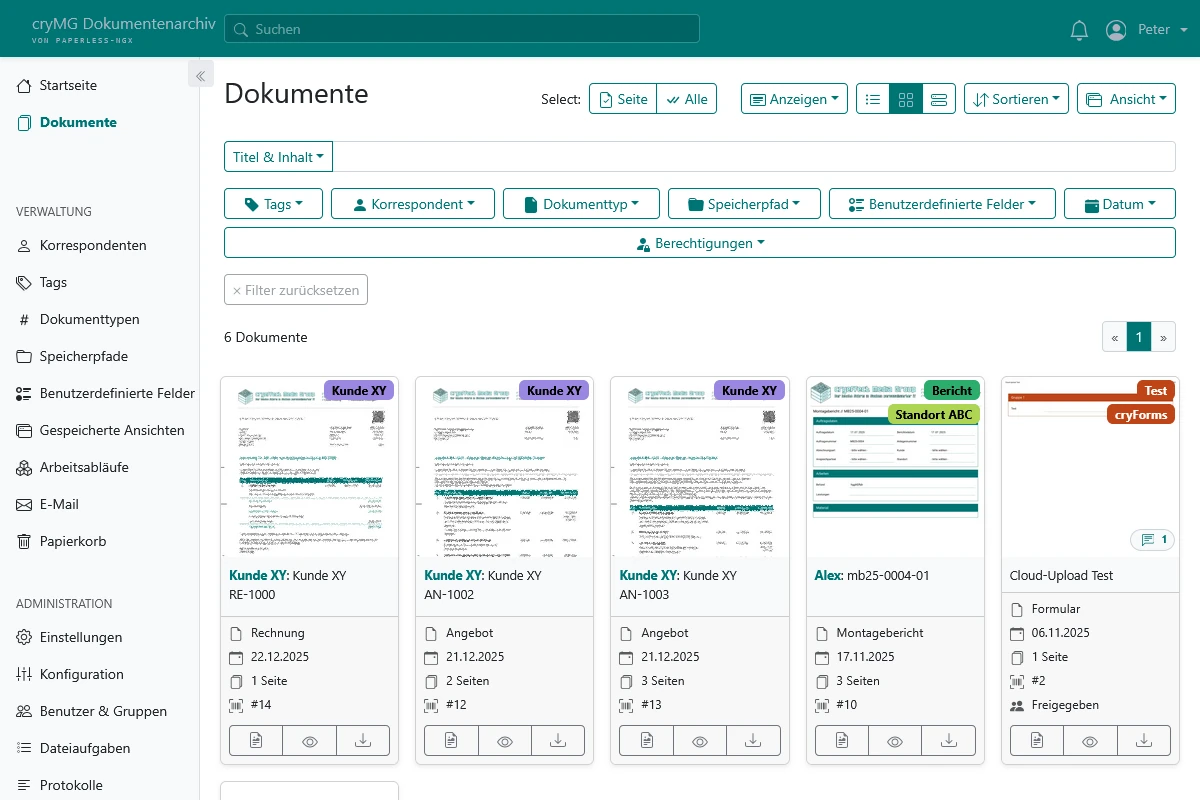
We deliberately avoid rigid folder structures to provide maximum flexibility. Instead, documents are organized by correspondents, document types, and tags (keywords).
With the powerful search function, documents can be found quickly and easily. Integrated automatic text recognition (OCR) also ensures that the content of scanned documents can be searched.
Over time, the system automatically learns how to assign documents to correspondents, document types, and tags — making archiving faster and easier.
You simply upload your documents and the system takes care of the rest.
How filing works
Add a document
Upload files or place them in a connected cloud folder.
Recognize automatically
OCR and assignment rules detect content, correspondent, and document type.
Archive securely
Documents are stored immutably and assigned the appropriate permissions.
Find them quickly
Full-text search, tags, and filters bring the required documents to your screen in seconds.
Optionally, each document can be assigned an archive serial number (ASN) to ensure even better traceability and to uniquely identify documents, for example in correspondence.
We support you with transparent and immutable archiving in line with the relevant GDPR and GoBD requirements. Compliance also depends on the processes and usage within your company.
Your own archive instance
You receive your own instance of the well-known archiving software Paperless-ngx.
Your company’s documents are securely isolated from other customers and only accessible to your employees. You can also decide which employees have access to which documents.
We take care of the administrative part completely and set up your instance according to your requirements.
Integration with cryForms
Our form solution cryForms includes direct integration with the document archive.
This allows you to send forms directly from cryForms to the document archive for archiving. All required metadata (correspondent, document type, tags) is transferred automatically and the necessary permissions are set.
Integration with your Cloud
If you also booked our Cloud, the document archive is integrated directly into your cloud instance.
In the cloud, you get a folder where you can simply place documents for archiving. These are then automatically imported into the document archive and processed accordingly.
Document archive or Cloud — which one is better for what?
The document archive is specifically designed for immutable document archiving and offers many features such as automatic text recognition (OCR), ASN assignment, and a powerful search function.
The Cloud on the other hand is more suitable for general storage and collaboration on files. It offers features such as file synchronization, collaborative editing, and communication tools like chat and video conferencing.
As a simplified rule of thumb: documents that are actively being worked on should be stored and edited in the cloud. Documents that should be archived and no longer changed belong in the document archive.
Central login via Single Sign-On
If you use multiple services with us, you benefit from our Single Sign-On (SSO).
With our Single Sign-On, each of your employees has one central login (account) that can be used to sign in to most of our services.
This means you and your employees no longer need a separate password for each service — just one. With it you can, for example, sign in to the document archive, the Cloud, cryForms, or the ticketing tool.
Optionally, you can also use two-factor authentication for additional security.
Direct support
If you ever have issues with our services, we help you directly and work with you to find a solution — not days later, but promptly.
Our support system records and documents everything in detail.
Scalability
Need more storage? No problem.
You can add almost any amount of storage and adapt your document archive to your needs.
Pricing
Tip
Our all-in-one package gives you a 10% discount on the included services and reduced setup fees.
Document archive base package
Our document archive base package is the foundation of our archive hosting and is required.
Included services:
- Your own document archive instance
- 5 document archive users
- 15 GiB storage
- Regular updates
- Daily backups
- Integration with your cryForms instance (if booked)
- Integration with your Cloud (if booked)
Price: €9.99 / month
Setup: €19.99 one‑off
Additional users
You can add any number of document archive users as needed.
Note: With SSO across multiple services, the number of users counts for all services.
Price: €0.99 / month / document archive user
Additional storage
Your available storage can be extended as needed and distributed among users.
Price: €0.10 / month / GiB
FAQ
How can I upload documents to the archive?
There are several ways to upload documents to the archive:
- Via the archive’s web interface from a PC or mobile device
- Via integration with your cryForms instance (if booked)
- Via integration with your Cloud (if booked)
- By email to a specific address
- Via the archive API (on request)
How can I access archived documents?
You can access archived documents via the archive’s web interface. There you can search, view, and download documents.
Sending by email directly from the web interface or sharing via link is also possible.
Which file formats are supported?
The document archive supports a wide range of file formats, including:
- PDF documents
- PNG, JPEG, TIFF, GIF, WebP images (converted into PDF documents)
- Plain text documents
- Common office documents (Word, Excel, PowerPoint, OpenDocument)
Are documents modified in the archive?
Yes and no. Documents are typically stored and processed in two variants.
First, the original document is stored unchanged. Second, a processed version is created that is optimized for display and search (e.g., via OCR text recognition).
How secure are my documents in the archive?
The archiving system stores documents immutably and makes later changes or deletions traceable.
In addition, regular updates and daily backups help protect your data as well as possible.
Even if you accidentally delete a document, we can restore it from one of the backups.
Get personal advice
Would you like to file documents more easily, find them faster, and archive them reliably? We will help you put together the right solution.